
 ×
EvTrack + Suprema BioStar X Integration
EvTrack's BioStar X integration delivers a fully automated visitor access control workflow between our visitor management platform & Suprema's BioStar X biometric access control platform.
Data Transferred to Suprema BioStar X
Name
Visitor created as a user on BioStar X
Email & Phone
Visitor contact details written to the BioStar X user
Visitor Photo
Enrolled as a BioStar X Visual Face credential
QR Code
EvTrack QR codes become BioStar X QR credentials, on the same user as the face credential
Visit Period
The visit period written to the BioStar X user
User Group & Access Group
EvTrack access lists map to BioStar X access groups
Custom Fields
ID / Passport No, Nationality, Country of Issue, Reason, Entity Type, Host and Check Status, mapped to BioStar X custom user fields
Removal
At check-out the visitor or their credentials are deleted - permit holders can stay active until the permit expires
How the Integration Works
A visitor is registered - pre-approved or walk-in - through a self-service kiosk, handheld guard device, registration form or the EvTrack web portal.
EvTrack captures the visitor's identity, photo and visit details through any connected endpoint - no manual data entry is required on the access control side.
EvTrack talks directly to the BioStar X API over HTTPS and creates the visitor as a user, with no middleware to install.
Name, visit period, user group, access group and mapped custom fields are written to BioStar X in a single, automated workflow.
The visitor's photo is enrolled as a Visual Face credential and the EvTrack QR code as a QR credential, ready for Suprema readers.
The visitor presents their face or QR code at a Suprema reader, and BioStar X grants or denies access instantly.
At check-out the visitor or their credentials are removed, and a nightly reconcile adds missing visitors and checks out ended visits.
Integration in Action
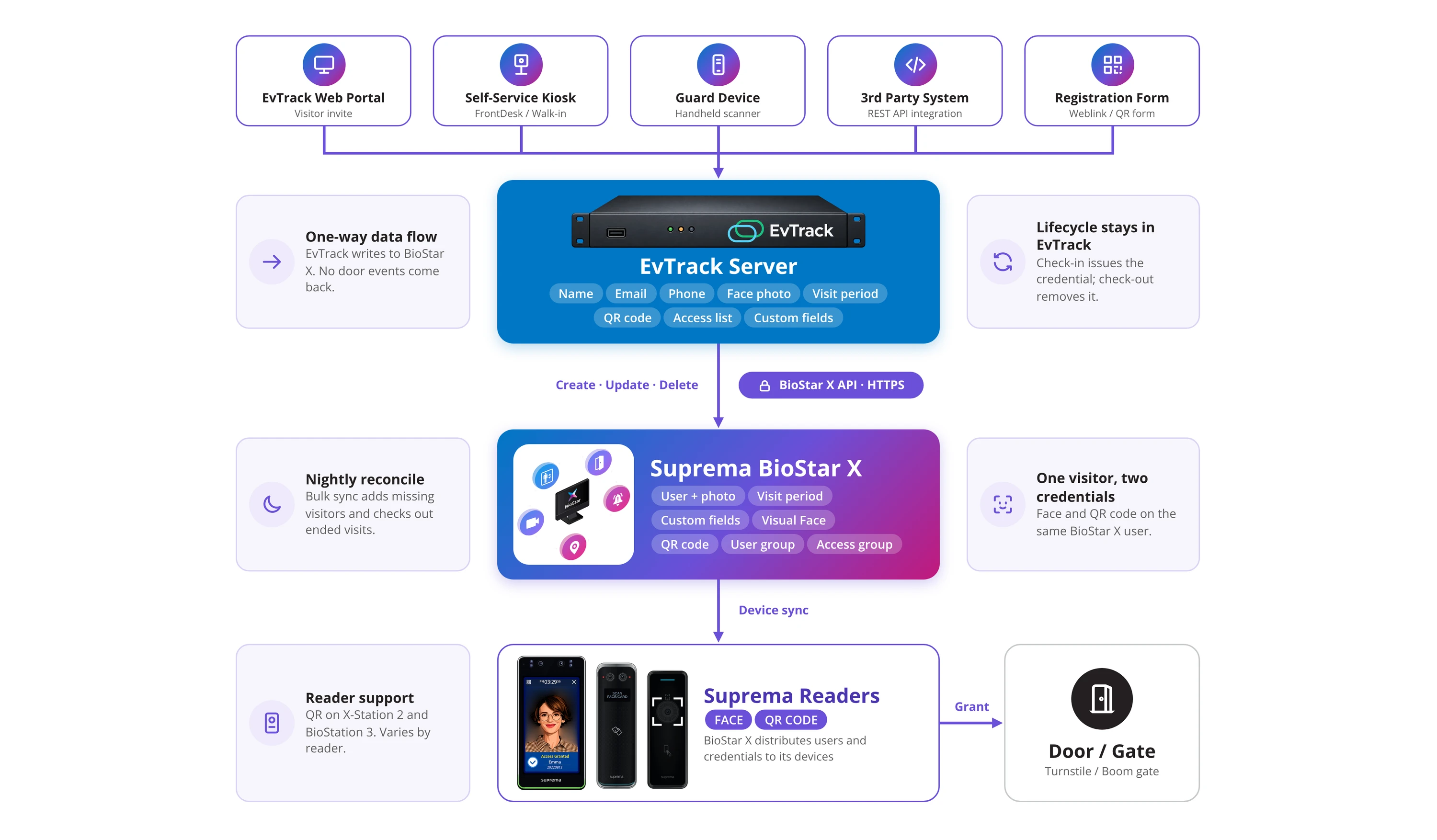
System architecture - EvTrack Server creates, updates and deletes visitors on Suprema BioStar X over the BioStar X API, one way, with no door events returned
Integration Documentation
Download the technical integration note for Suprema BioStar X.
Suprema, BioStar X, BioStation and X-Station are trademarks of Suprema Inc. Their use here identifies compatible products and does not imply endorsement. EvTrack is a trademark of EvTrack (Pty) Ltd.
Ready to Streamline Your Visitor Management?
Join hundreds of organisations worldwide using EvTrack for secure, seamless access control.